
Lexitas Exhibit
Manager
Schedule a Lexitas Exhibit Manager demo
The Easy Way To Introduce Electronic Exhibits
Exhibit handling is a key consideration litigators face when planning to conduct a remote deposition. Depending on the needs of the case, the taking attorney may opt to use an exhibit sharing platform to electronically mark and introduce exhibits, especially when numerous documents or multiple parties are involved.
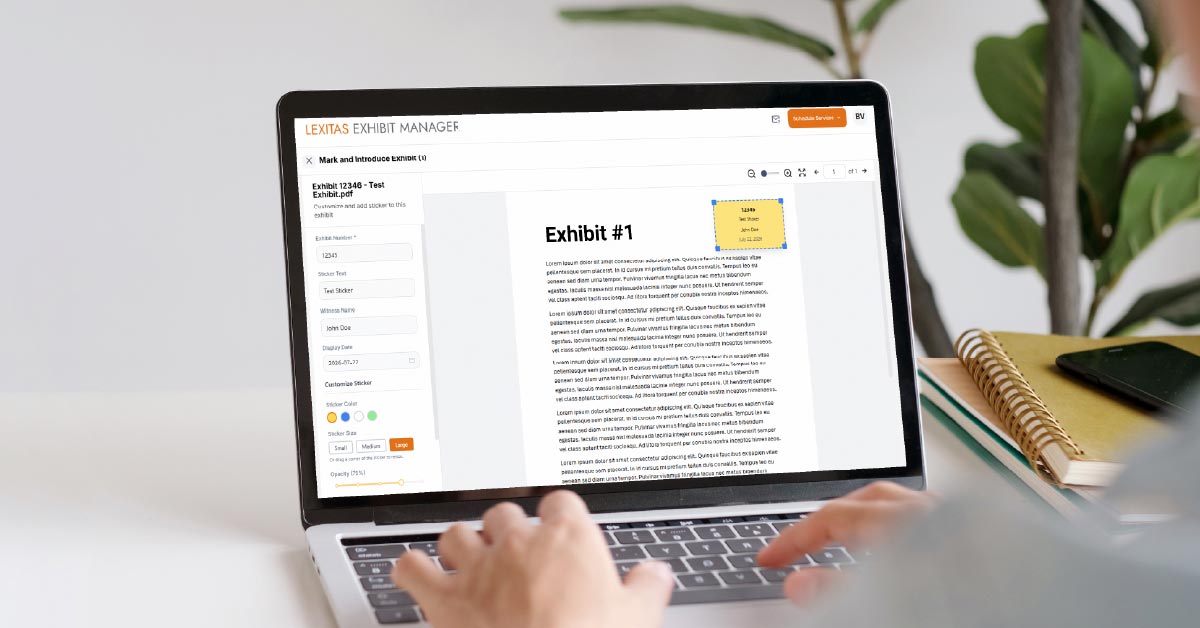
Lexitas Exhibit Manager, a sophisticated but simple interface, enables attorneys to upload exhibits to a secure repository, easily mark exhibits online, and introduce them electronically within the remote deposition environment.
As a permissions-based system, Lexitas Exhibit Manager preserves confidentiality. Before the deposition, attorneys and their teams can upload a universe of materials to a private case folder. During the deposition, the attorney or document technician can select the appropriate file, apply an electronic exhibit sticker, and introduce the exhibit. The marked exhibit is then placed into a shared folder for participants to view and download via a secure link. At the end of the deposition, all parties, including the court reporter, can leave with a final set of the marked exhibits.
Focus on Testimony, Leave the Exhibit to UsLexitas skilled Document Technicians act as the "hot seat operator" behind the scenes of the remote deposition to introduce exhibits on cue, and assist with marking, annotating, and screen sharing the final exhibit files. Give your full attention to the testimony while our technicians handle the exhibits for you. |
-
Upload your full universe of exhibits to your private folder in our secure repository.
-
Select your exhibits and apply the exhibit sticker with a single click. Easily move or change the transparency of the exhibit sticker.
-
Share only the final marked exhibits with all deposition participants via a secure link.
Discover the Benefits of Lexitas Exhibit Manager
Lexitas Exhibit Manager is simple to use, making it easy to introduce electronic exhibits in just a few simple steps. Run Lexitas Exhibit Manager on your own or request one of our skilled document technicians to oversee the exhibit marking process for you.
Lexitas offers a well-executed exhibit management experience for remote depositions.
Lexitas Exhibit Manager FAQ
How do I log in to Lexitas Exhibit Manager?
You will receive an email from our Lexitas scheduling team to create an account. Click the button in the email to be directed to the Lexitas Exhibit Manager log in page.
How can I share files with someone who does not have a Lexitas Exhibit Manager account?
You can share the Private folder with colleagues by selecting the share button and inviting them by adding their email.
How are exhibits shared with other parties, including the court reporter, at the deposition?
All attendees will receive an email with a secure link to access the Shared folder. The link expires 7 days after the deposition.
Can a file be deleted from the Shared folder?
While files can be deleted, this action should be limited to a Lexitas team member or the assigned Document Technician. Deleting a file from the Shared folder will also remove it from the Private folder.
Can I or someone on my team act as the ‘hot seat operator’ to run Lexitas Exhibit Manager?
Yes. Lexitas Exhibit Manager is designed so that you can navigate the system on your own. However, if requested, a Lexitas Document Technician can attend the proceeding to oversee all aspects of exhibit handling for you.
Do the files that I upload to Lexitas Exhibit Manager expire?
What is Lexitas Exhibit Manager?
Lexitas Exhibit Manager is a sophisticated but simple interface that enables attorneys to upload exhibits to a secure repository, and mark and introduce them electronically within the remote deposition environment.
How far in advance does Lexitas Exhibit Manager need to be requested?
Lexitas requires 24 hours in advance of your scheduled proceeding to set up Lexitas Exhibit Manager for your case.
What folder should I use to upload my files before the deposition?
Potential exhibit files should only be uploaded to the Private folder. Other parties do not have access to this private folder.
What if I don’t receive the email invitation to upload my exhibits?
What type of files can be uploaded?
All file types are supported, including video files. You can upload files individually or in batches.
Can I introduce previously marked exhibits – without applying a new exhibit sticker?
When uploading an exhibit, users should select the "Previously Marked Exhibit" option. This allows the exhibit to be introduced without applying a new exhibit sticker.